Any FLV Player:


Social Bookmark:


 reddit
 furl
furl google
 yahoo
yahoo technorati
  icerocket
History:
- Version 2.1.0 [Jul 04, 2022] Bugs fixed
- Version 2.0.1 [May 30, 2022] Bugs fixed
- Version 2.0.0 [Apr 08, 2022] Playlist supported
- Version 1.2.0 [Feb 25, 2022] Added two new languages,bugs fixed
- Version 1.1.3 [Dec 18, 2021] Added Multi-language support
- Version 1.1.2 [Jun 08, 2022] Bugs fixed
- Version 1.0.2 [Apr 28, 2022] Improved the SWF player object, bugs fixed
- Version 1.0.1 [Apr 23, 2022] First version 1.0.1 released
Sponsored Links
- Make photo slideshows for TV, PC, iPod, iPad, PSP, Website, YouTube, MySpace and more
- Links4se.com
- FLV Video Encoder
- Flash Slideshow Maker
- DVD Photo Slideshow
- Any FLV Converter
- FLV Player
- Wedding Slideshow Studio
- Myspace Profile Video
- FLV Player (Japanese)
- MySpace Video (Japanese)
- Add Video to Website
- M4P Converter Software
- FLV Video
How to Add Logo / Ads with an Embedded Link to Web Player
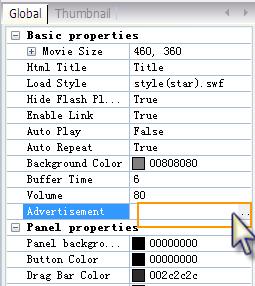
Some people may want to add a logo or an advertisement with an embedded link to web player, which is considered as another strategy in product advertising and website promotion. Well, Any Flv Player has such advertising function with advanced templates but only for registered users. That is, you need to buy the program and then use thelicense name and code to register it so as to enjoy full function. 1) The format of the ad image can be jpeg, gif, jpg, png and swf If you want to add an advertisement image with no target link on it, the format of the image can be jpeg, gif, jpg and png. If you want to add a target link to a web page for the advertisement image, the format must be swf. You may use Flash Slideshow Maker, Macromedia Flash, SnagIt or other tools to add URL easily to the image and save it as swf format.
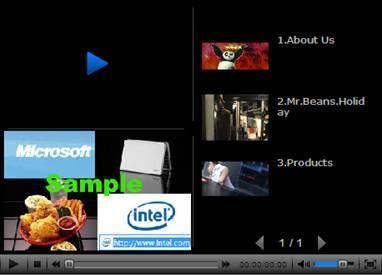
2) Choose advertising templates 3) Add image to player Sample:
|